Table of Contents
If you have an IPTV subscription and you’re not using TviMate, you’re leaving a lot on the table. While most IPTV players get the basics right, TiviMate goes several steps further — delivering a polished, cable-TV-style experience on Android devices that rivals anything you’d find from a traditional pay-TV provider.
In this complete guide, you’ll learn exactly what TiviMate is, what makes it stand out from the competition, how to install and configure it on your device, and whether upgrading to TiviMate Premium is worth the cost. Whether you’re a first-time cord-cutter or a seasoned IPTV user looking to upgrade your setup, this guide has everything you need.
What Is TviMate and Why Is It Different
TiviMate is an Android-based IPTV player application designed specifically for big-screen viewing on televisions and streaming devices. Unlike general-purpose media players, TiviMate was built from the ground up for IPTV — every aspect of the interface is optimized for remote control navigation, channel browsing, and live TV viewing. Best-iptv-service
The key distinction worth understanding: TiviMate is a player, not a content provider. It doesn’t provide channels or subscription content itself — it organizes and displays the channels you get from your IPTV provider, offering features like EPG guides, recording, and playlists for a better streaming experience. You bring your own IPTV subscription; TiviMate makes it look and feel premium.
TiviMate is the best IPTV player for Android TV and Fire Stick — no other app matches its EPG quality and interface polish. IPTV US That reputation has been built over several years and holds firm in 2026, with the app continuing to dominate among power users and casual viewers alike on Android-based platforms.
The one significant limitation to know upfront: TiviMate only works on Android-based devices, so iPhone and Samsung Smart TV users are out of luck. If you’re on iOS or a non-Android Smart TV, you’ll need to consider alternatives.
TiviMate Key Features
TiviMate earns its reputation through a feature set that no competitor has fully matched. Here’s what sets it apart:
Electronic Program Guide (EPG)
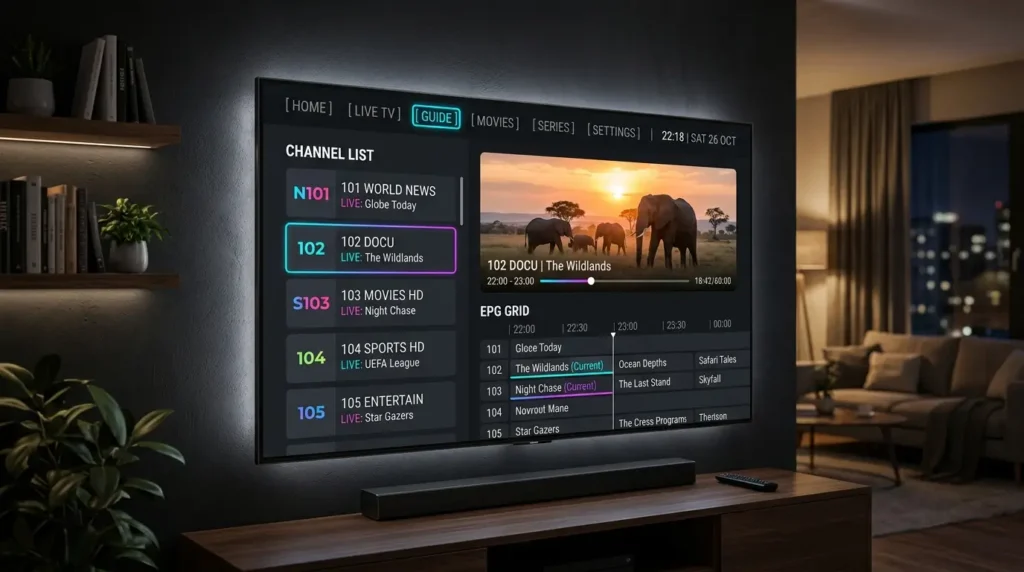
TiviMate’s EPG is its crown jewel. The full-screen guide displays a grid-style layout similar to traditional cable or satellite TV guides. You can scroll through channels vertically and through time slots horizontally. The guide supports up to 7 days of programming data, and channels are color-coded by category — sports, news, entertainment, movies — for quick identification. Best-iptv-service
Channel Switching Speed
TiviMate switches channels in under one second, significantly faster than competing players like IPTV Smarters Pro or Smart IPTV. Best-iptv-service For live sports and news viewers, that speed difference is immediately noticeable.
Multi-Playlist Support
TiviMate supports multiple playlists simultaneously, which means you can load channels from different IPTV providers and browse them all in one place. This is particularly useful if you combine a primary IPTV service with a secondary one for sports or international channels.
Built-In Recording
The recording feature works reliably and lets you schedule recordings through the EPG — a function most free apps skip entirely. You can record directly to a USB drive or external storage connected to your device.
Picture-in-Picture (PiP)
Continue watching a channel while browsing the guide or channel list. This is a small but genuinely useful feature that most competing apps don’t offer.
Low Resource Usage
The app is lightweight and runs smoothly even on the base Fire Stick model without lag or crashes. You don’t need a high-end device to enjoy TiviMate at its best.
EPG Auto-Updates
You can adjust the layout, set favorite channel groups, and configure auto-updates so the guide stays current without manual refreshes.
TiviMate Free vs. Premium: What Should You Choose?
TiviMate is available in two tiers, and understanding the difference helps you decide what’s right for your setup.
The free version is genuinely capable. It supports a single playlist, full EPG functionality, channel favorites, and basic customization. For a casual viewer with one IPTV provider and simple needs, the free tier covers everything necessary for daily use.
TiviMate Premium unlocks the features that power users care about most:
- Multiple playlists (essential if you use more than one IPTV provider)
- Local recording and scheduled recording via EPG
- Parental controls
- Auto-frame rate switching for smoother 4K playback
- Panel/provider management for resellers and advanced users
TiviMate’s free tier is excellent for single-playlist users; premium is $5.99/year. IPTV US Some sources cite pricing closer to $10/year or $30 for a lifetime license depending on the purchase method — check the current price directly in the app or on Google Play before buying.
Verdict: If you have a single IPTV subscription and watch mostly live TV, the free version is perfectly adequate. If you want recording, multiple providers, or parental controls, Premium pays for itself within the first week of use.
How to Install TiviMate on Firestick and Android TV
Installation is straightforward on both platforms. Here’s how to get TiviMate running on the most popular devices.
On Amazon Fire Stick / Fire TV:
- From the Fire Stick home screen, go to Settings → My Fire TV → Developer Options
- Enable Apps from Unknown Sources
- Download the Downloader app from the Amazon Appstore
- Open Downloader and enter the TiviMate APK URL (available on the official TiviMate website)
- Install the APK and open TiviMate
- Add your IPTV playlist using your M3U URL or Xtream Codes credentials
On Android TV / Google TV:
Search for TiviMate IPTV Player on the Google Play Store, click Install, and wait for the download to complete. The Google Play version receives automatic updates, so you’ll always have the latest features. This is the simplest installation method available.
On Nvidia Shield, Chromecast with Google TV, or Android TV Boxes:
The same Google Play method applies to all Android TV devices. TiviMate is natively optimized for these platforms and runs exceptionally well on higher-end hardware like the Nvidia Shield.
Native non-Android Smart TVs — like many Samsung and LG models — may need a compatible Android box or casting workaround. Alternatives like GSE Smart IPTV or built-in players may be better on those TVs.
How to Add Your IPTV Subscription to TiviMate
Once TiviMate is installed, adding your IPTV service takes just a few minutes:
- Open TiviMate and select Add Playlist
- Choose your connection method:
- M3U URL — paste the playlist link provided by your IPTV provider
- Xtream Codes API — enter your server URL, username, and password
- Stalker Portal — enter the portal URL and MAC address if your provider uses this format
- Allow TiviMate to import your channels and EPG data (this may take a minute depending on the size of your playlist)
- Organize your channels into groups, set favorites, and configure the EPG display to your preference
EPG accuracy depends on the data your provider supplies. TiviMate displays and organizes EPG data very well, but schedule accuracy varies by provider and region. You can tweak EPG settings to reduce clutter or sync guide times.
Troubleshooting tip: If you experience buffering, try a wired Ethernet connection, switch to 5GHz Wi-Fi, clear the app cache, reduce concurrent streams, and restart your router and device weekly. Also verify your provider’s server status — many issues stem from overloaded servers, not the app itself.
TiviMate vs. Other IPTV Players
How does TiviMate stack up against the main alternatives in 2026?
TiviMate vs. IPTV Smarters Pro
IPTV Smarters offers broader device compatibility, including iOS and Smart TV support, with a clean and straightforward interface. TiviMate provides deeper customization, built-in recording, and multi-playlist management, but only works on Android-based devices. The choice depends on whether you prioritize device coverage or advanced features.
TiviMate vs. Kodi
Kodi is a full multimedia center rather than a dedicated IPTV player. It’s more powerful in theory but comes with a steep learning curve. For users comfortable with setup, Kodi is powerful and completely free. For everyone else, a dedicated IPTV app will be quicker to get running. TiviMate wins for ease of use; Kodi wins for maximum flexibility.
TiviMate vs. OTT Navigator
OTT Navigator shines when you have huge channel lists. It is built for speed and powerful filters, so switching and finding events stays fast during sports nights. At a lower price point, it’s a legitimate alternative — but most users find TiviMate’s interface more polished overall.
Bottom line: TiviMate dominates Android TV, IPTV Smarters Pro covers the broadest range of platforms, and VLC is the universal fallback. Understanding which player works best for your specific setup is as important as choosing the right IPTV service.
Frequently Asked Questions
Does TiviMate work on iPhone or iPad? No. TiviMate is Android-only. For iOS devices, consider IPTV Smarters Pro or GSE Smart IPTV.
Does TiviMate include channels? No. TiviMate is a media player only and does not provide any TV content. You need a separate IPTV subscription.
What formats does TiviMate support? TiviMate supports M3U playlists, Xtream Codes API, and Stalker Portal — the three most common formats used by IPTV providers worldwide.
Can I record live TV with TiviMate? Yes, but only with TiviMate Premium. Recording requires either internal device storage or an external USB drive connected to your device.
Is TiviMate legal? IPTV apps are legal software — they function as media players. The legality depends on the content you access through them. Using TiviMate with a licensed, legitimate provider is completely legal.
How many devices can I use TiviMate on? TiviMate Premium can be activated on multiple devices linked to the same Google account. Check your specific license terms for the exact limit.
Conclusion: Is TiviMate Worth It?
For any IPTV user on an Android-based device, TiviMate is the clear first choice. The EPG quality, channel switching speed, multi-playlist support, and built-in recording put it in a category of its own. The free tier is more capable than most paid alternatives, and the Premium upgrade — at roughly $5.99/year — is one of the best value propositions in the streaming world.
If you’re serious about your IPTV setup, download TiviMate today, pair it with a reliable IPTV provider, and experience the difference a great player makes.